

Tips To Get a 90% Lighthouse Performance Score
Transfon Team
3 min read


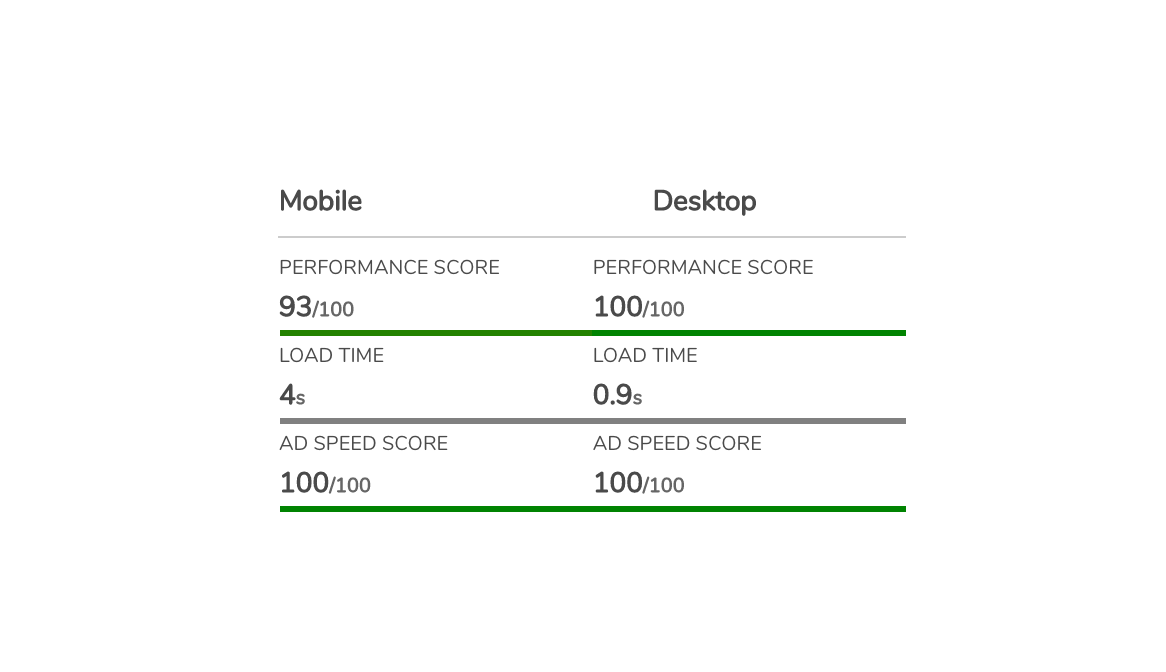

Google Lighthouse performance score is very important for SEO. Many publishers have seen SEO performance increase by optimising page speed. But when looking at our own website we can see lots of third-party scripts — what can we do to improve the Google Lighthouse performance score?
Recently we've tried to optimise one of our own websites by following the following tips where how to get 100% score for desktop and more than 90% score for mobile.

Reduce the requests number on page

Any HTTP request sending from user’s browser to your web server contributing to the slower performance. So we've to try to reduce the request number as much as possible. In our test, we have reduced the total request from 120 to 40.
Lazy load the off-screen images
We don't want to harm user experience to see blank images. But for a normal webpage, we can always lazy load the off-screen images. Displaying images once a user scrolling to the images' position.
Javascript code for offloading off-screen images:
<script>
function lzload() {
  var imgDefer = document.getElementsByTagName('img');
  for (var i = 0; i < imgDefer.length; i++) {
    if (imgDefer[i].getAttribute('data-src')) {
      var boundingClientRect = imgDefer[i].getBoundingClientRect();
      if(boundingClientRect.top < window.innerHeight) {
        imgDefer[i].setAttribute('src',imgDefer[i].getAttribute('data-src'));
        imgDefer[i].removeAttribute("data-src");
      }
    }
  }
}

window.addEventListener('scroll', lzload);
window.addEventListener('load', lzload);
window.addEventListener('resize', lzload);

</script>
Then you've to change image src to be data-src which tells the browser not load the image URL until user started
to scroll to the image's position.
Offload third party javascript tags
Some javascript tags are necessary for the first screen, but we can offload the other JavaScript once a user started to scroll. For publishers running ads, third-party ad scripts are often the biggest performance bottleneck — see our guide on how ads affect Core Web Vitals for detailed strategies.
We can do so to the scripts like a Facebook like button or the other javascript trackers.
Javascript code to offload third party tags until user scrolling:
window.addEventListener(
  'scroll',
  function () {
    setTimeout(function () {;(function () {
        var st = document.createElement('script')
        st.type = 'text/javascript'
        st.async = true
        st.src = 'MY_URL'
        var s = document.getElementsByTagName('script')[0]
        s.parentNode.insertBefore(st, s)
      })()
    }, 100)
  },
  { once: true }
)
Remove useless CSS and Javascripts
Nowadays people like to use a CSS framework like bootstrap to build a website. This massively reduced the development time. But one problem there are lots of unused codes. We can identify the unused codes with the Chrome browser.
There's a feature called coverage. You can see the not used CSS and JavaScript code marked by Chrome browser. But be careful to remove the unused code because the code might be used by the other pages.
Preconnect domains DNS
Reconnecting the domains used on the page, the time to request third party scripts can be reduced.
Check which domains are used by your webpages, pre-connect them at the header of your webpages.
Preconnect example:
<link rel="preconnect" href="https://example.com">
100% performance score

These Lighthouse optimizations directly support your Core Web Vitals, which Google uses as a ranking signal. If your site struggles with responsiveness after optimizing load speed, see our guide on how to improve your INP score.
Need ongoing Lighthouse audits without the manual work? Pubperf runs automated Lighthouse audits on your pages every hour and alerts you when scores drop.